
Troubleshooting
We will update this document as we gather troubleshooting examples. (Written in Nov 04, 2021)
prerequisites.sh Script Failed
prerequisites.sh Script FailedPlatform Specific Installation
sudo apt install -y build-essential nasm autoconf libtool zlib1g-dev tclsh cmake curlsudo yum install -y gcc-c++ make nasm autoconf libtool zlib-devel tcl cmake# for downloading latest version of nasm (x264 needs nasm 2.13+ but centos provides 2.10 )
sudo curl -so /etc/yum.repos.d/nasm.repo https://www.nasm.us/nasm.repo
sudo yum install centos-release-scl
sudo yum install -y bc gcc-c++ cmake nasm autoconf libtool glibc-static tcl bzip2 zlib-devel devtoolset-7
source scl_source enable devtoolset-7Common Installation
PREFIX=/opt/ovenmediaengine && \
OPENSSL_VERSION=1.1.0g && \
DIR=/tmp/openssl && \
mkdir -p ${DIR} && \
cd ${DIR} && \
curl -sLf https://www.openssl.org/source/openssl-${OPENSSL_VERSION}.tar.gz | tar -xz --strip-components=1 && \
./config --prefix="${PREFIX}" --openssldir="${PREFIX}" -Wl,-rpath="${PREFIX}/lib" shared no-idea no-mdc2 no-rc5 no-ec2m no-ecdh no-ecdsa no-async && \
make -j 4 && \
sudo make install_sw && \
rm -rf ${DIR} && \
sudo rm -rf ${PREFIX}/binPREFIX=/opt/ovenmediaengine && \
SRTP_VERSION=2.2.0 && \
DIR=/tmp/srtp && \
mkdir -p ${DIR} && \
cd ${DIR} && \
curl -sLf https://github.com/cisco/libsrtp/archive/v${SRTP_VERSION}.tar.gz | tar -xz --strip-components=1 && \
./configure --prefix="${PREFIX}" --enable-shared --disable-static --enable-openssl --with-openssl-dir="${PREFIX}" && \
make shared_library -j 4 && \
sudo make install && \
rm -rf ${DIR}systemctl start ovenmediaengine failed
systemctl start ovenmediaengine failedCheck SELinux
Streaming is not smooth
1. If you are using Transcoding as Bypass in OvenMediaEngine, and streaming does not work in all players
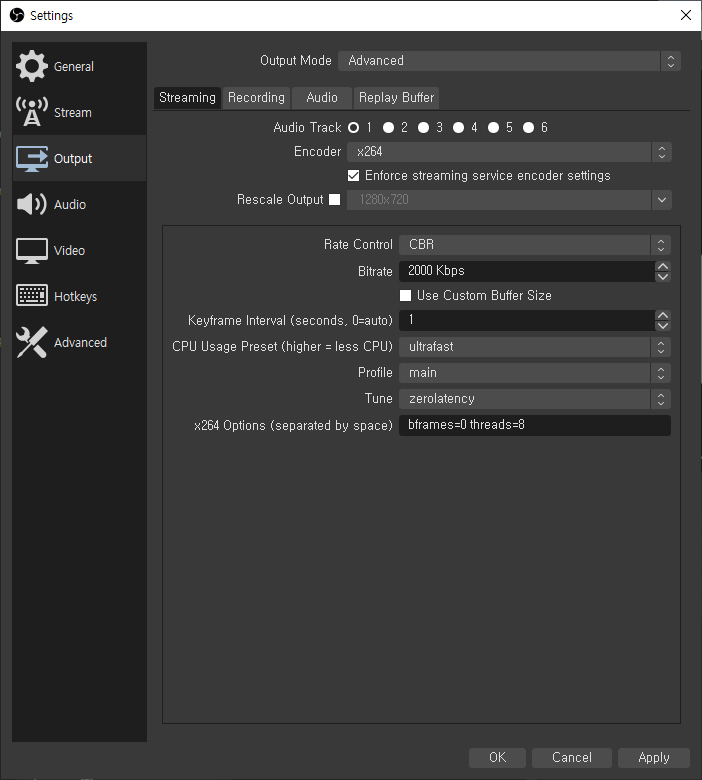
2. When streaming does not work in some players
3. When streaming fails due to excessive CPU/Memory/Network usage of Origin in OvenMediaEngine
4. When streaming fails due to excessive CPU/Memory/Network usage of Edge in OvenMediaEngine
5. If you have enough CPU/Memory/Network, but streaming is not smooth
5-1. When a specific thread is using the CPU excessively
5-2. Tuning your Linux kernel
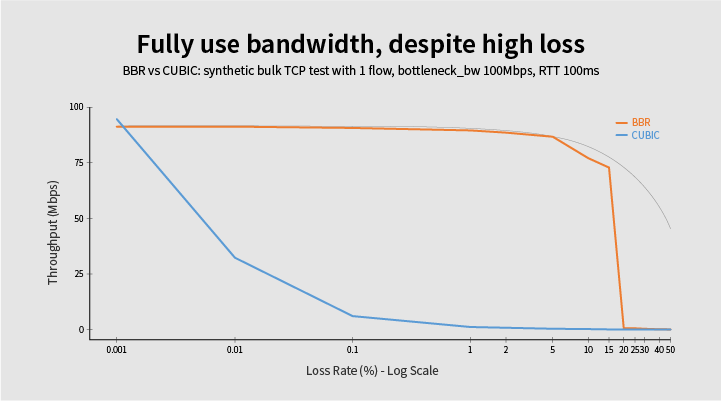
5-3. Congestion Control: Change to BBR
Player connection fails
1. Due to the Mixed Contents
2. Due to a Cross-Origin Resource Sharing (CORS) Error
3. When the message "Too many open files" appears in the log, the player cannot connect
Player takes a long time first to load while trying to stream
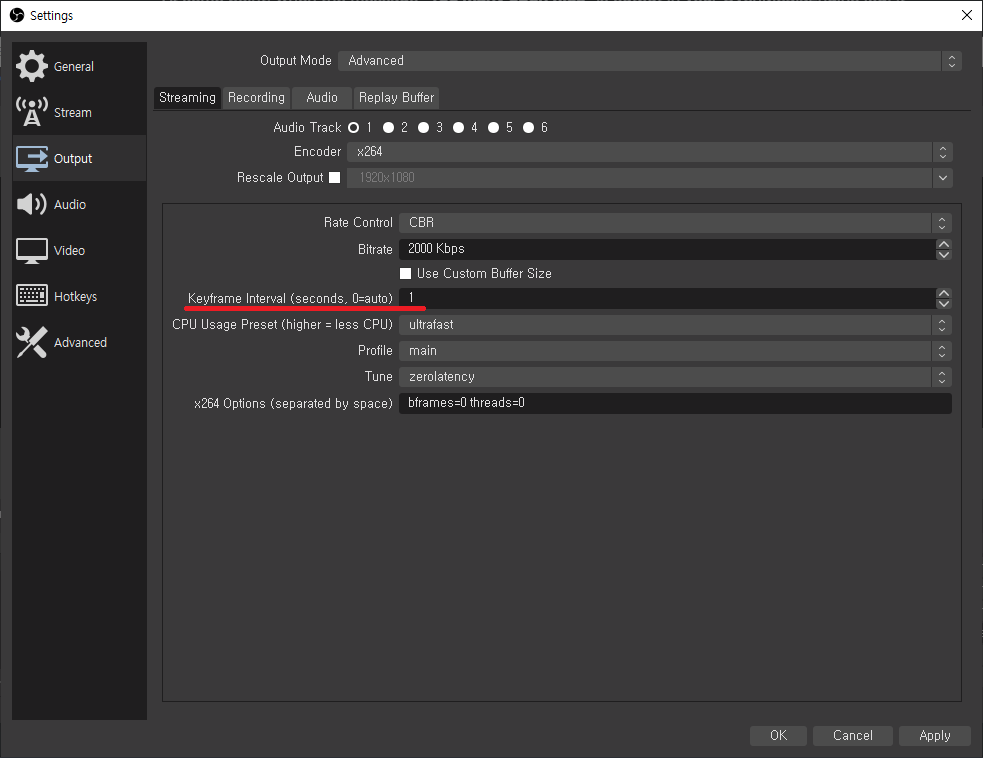
1. Due to the Keyframe Interval
A/V is out of sync
1. When the A/V sync does not match during initial streaming, and it gradually fits
2. Time has passed, but A/V is out of sync
No audio is output
1. When Opus is not set in the encoding options
Not the video quality you want
1. When video encoding is enabled in OvenMediaEngine
2. If you are using Transcoding as Bypass in OvenMediaEngine
Was this helpful?